
Teaching a robot arm to move blocks
Vision-language-action (VLA) models function as policies for robots. They take as input a camera feed and text instructions, and return actions to execute. In this tutorial, we teach Qwen3-VL-8B to act as one. Given an overhead image of a table and an instruction like “Put the yellow block in the blue tray”, it answers with where to pick and where to place:
PICK(412, 268) PLACE(731, 590)We then carry out that command in a MuJoCo physics simulation, and the model only gets the full reward if the block actually lands in the right tray.
import asyncioimport base64import sysimport timefrom argparse import Namespacefrom collections.abc import Iterable, Iteratorfrom concurrent.futures import ThreadPoolExecutorfrom pathlib import Pathfrom typing import Any, Protocol
from modal_dojo import (    Checkpoint,    CustomDeployment,    MultimodalDataset,    Qwen3_VL_8B,    Qwen3_VL_8B_Recipe,    TrainConfig,)
sys.path.insert(0, str(Path(__file__).resolve().parent))import sim
model = Qwen3_VL_8B()
Set up the simulator
Each scene is a table with four colored blocks and three trays, all placed randomly from a seed. The simulator, in sim.py, grabs the block under the pick point, drops it over the place point, and lets MuJoCo physics decide where it lands.
Define a scoring function
Success alone is a sparse signal, so we also give partial credit for picking the right block. This gives the model more granular rewards to learn from.
def score_response(response: str, seed: int) -> tuple[float, bytes | None]: command = sim.parse_command(response) if command is None: return 0.0, None result = sim.execute(seed, command) if result["success"]: return 1.0, result["image"] if result["picked"] == sim.sample_scene(seed)["target_block"]: return 0.25, result["image"] return 0.0, result["image"]Get the dataset
We generate scenes from the simulator and use each scene’s seed as its label, so every scene is unique and the reward function can rebuild it for grading.
PROMPT = (    "<image>\n"    "You control a robot with a suction gripper. The image is an overhead view "    "of the table.\n"    "Instruction: {instruction}\n"    "Respond with only a command of the form PICK(x, y) PLACE(x, y), where (x, y) "    "are image coordinates from 0 to 1000, x from left to right and y from top to "    "bottom. Pick at the center of the block and place over the center of the tray.")

class PickAndPlaceDataset(MultimodalDataset):    def __init__(self, seeds: Iterable[int]) -> None:        self.seeds = list(seeds)        super().__init__(modality="image")
    def source_rows(self) -> Iterator[dict[str, Any]]:        for seed in self.seeds:            instruction = sim.sample_scene(seed)["instruction"]            image = base64.b64encode(sim.overhead_image(seed)).decode("ascii")            yield {                "prompt": PROMPT.format(instruction=instruction),                "media": f"data:image/png;base64,{image}",                "label": str(seed),            }

train_dataset = PickAndPlaceDataset(range(2048))eval_dataset = PickAndPlaceDataset(range(100_000, 100_100))
Deploy the base model
Some models don’t have native Endpoint support, so we use a CustomDeployment to deploy the base and trained models.
def deploy_base_model() -> CustomDeployment: print("deploying base model deployment...") base_deployment = CustomDeployment.launch( model, unauthenticated=True, app_name="pick-and-place-baseline", ) base_deployment.wait_until_ready(timeout=3000) print(f"base model deployed to {base_deployment.url}") return base_deploymentEvaluate the base model
We report two rates: how often the model picks the right block, and how often that block ends up in the right tray. Separating them shows whether errors come from reading the instruction or from placement.
def run_eval(deployment: CustomDeployment, max_concurrency: int = 8) -> None:    def _score_one(row: dict[str, Any]) -> float:        content = [            {"type": "text", "text": row["prompt"].replace("<image>", "").strip()},            {"type": "image_url", "image_url": {"url": row["images"][0]}},        ]        message = deployment.chat([{"role": "user", "content": content}])        response = model.parse_response(message.get("content") or "").content        reward, _ = score_response(response, int(row["label"]))        return reward
    with ThreadPoolExecutor(max_workers=max_concurrency) as executor:        rewards = list(executor.map(_score_one, eval_dataset.rows()))    picked = sum(reward > 0 for reward in rewards) / len(rewards)    success = sum(reward == 1.0 for reward in rewards) / len(rewards)    print(f"picked right block: {picked:.1%}")    print(f"success rate: {success:.1%}")

def run_baseline_evals(deployment: CustomDeployment) -> None:    print("running base model evaluation...")    run_eval(deployment)
Creating a reward function
The reward function scores many rollouts concurrently, so we keep the CPU-bound simulation off the event loop. We also attach each rollout’s final frame so you can see what the model actually did in the dashboard’s rollout view.
class RolloutSample(Protocol):    response: str    label: str    metadata: dict[str, Any] | None

async def pick_and_place_rm(    args: Namespace, sample: RolloutSample, **kwargs: object) -> float:    response = model.parse_response(sample.response or "").content    reward, image = await asyncio.to_thread(        score_response, response, int(sample.label)    )    if image is not None:        data_uri = "data:image/png;base64," + base64.b64encode(image).decode("ascii")        sample.metadata = {**(sample.metadata or {}), "image": data_uri}    return reward
Begin training
The reward function runs the simulator inside the training containers, so the
training image needs MuJoCo, a headless renderer (OSMesa), and sim.py.
GRPO learns by comparing several answers to the same prompt, so the base model
should succeed some of the time, but not always. In sim.py, N_BLOCKS and
N_TRAYS set the task’s difficulty to keep it in that range.
config = TrainConfig(    model=model,    dataset=train_dataset,    recipe=Qwen3_VL_8B_Recipe(        actor_num_gpus_per_node=8,        tensor_model_parallel_size=4,        num_rollout=200,        rollout_batch_size=8,        n_samples_per_prompt=8,        global_batch_size=32,        rollout_max_response_len=64,        custom_rm_function=pick_and_place_rm,        image_overlay=lambda image: (            image.apt_install("libosmesa6")            .uv_pip_install("mujoco==3.16.0", "numpy==2.5.3", "pillow==13.0.0")            .add_local_file(sim.__file__, remote_path="/root/sim.py", copy=True)        ),    ),)

def train(config: TrainConfig) -> Checkpoint:    with config.launch() as run:        print(f"run id: {run.training_run_id}")        checkpoint = None        while True:            done = run.done()            latest = run.latest_checkpoint()            if latest is not None and latest != checkpoint:                checkpoint = latest                print(f"new checkpoint: {checkpoint.path}")            if done:                break            time.sleep(30)        if checkpoint is None:            raise RuntimeError("run produced no checkpoint")        print(f"checkpoint: {checkpoint.path}")    return checkpoint
Evaluate the trained checkpoint
Let’s run the same eval on the trained checkpoint.
def deploy_trained_model(checkpoint: Checkpoint) -> CustomDeployment:    print("deploying trained model deployment...")    trained_deployment = CustomDeployment.launch(        model,        checkpoint,        unauthenticated=True,        app_name="pick-and-place-trained",    )    trained_deployment.wait_until_ready(timeout=3000)    print(f"checkpoint deployed to {trained_deployment.url}")    return trained_deployment

def run_trained_evals(trained_deployment: CustomDeployment) -> None:    print("running checkpoint evaluation...")    run_eval(trained_deployment)

if __name__ == "__main__":    base_deployment = deploy_base_model()    run_baseline_evals(base_deployment)    checkpoint = train(config)    trained_deployment = deploy_trained_model(checkpoint)    run_trained_evals(trained_deployment)
Results
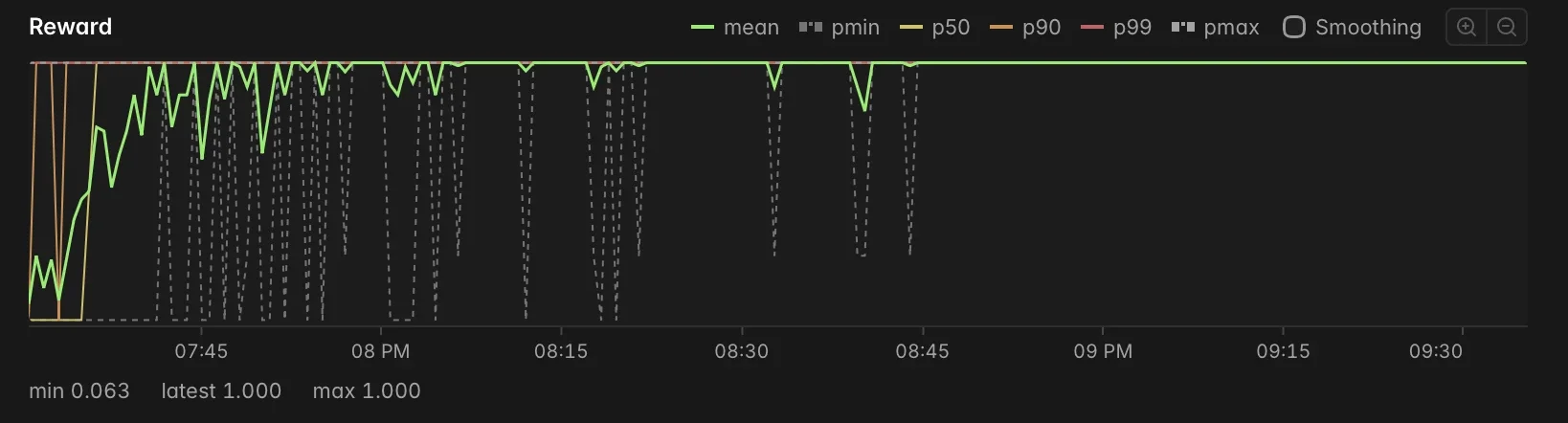
The reward combines picking and placing into one number, so the eval below reports them separately.
| Model | Picked right block | Success rate |
|---|---|---|
| Base | 20% | 13% |
| Trained | 91% | 88% |
After 200 steps, the model succeeds on 88% of held-out scenes, up from 13%. The base model usually fails by grabbing the wrong block, while the trained model picks the right one 91% of the time.